For reference:
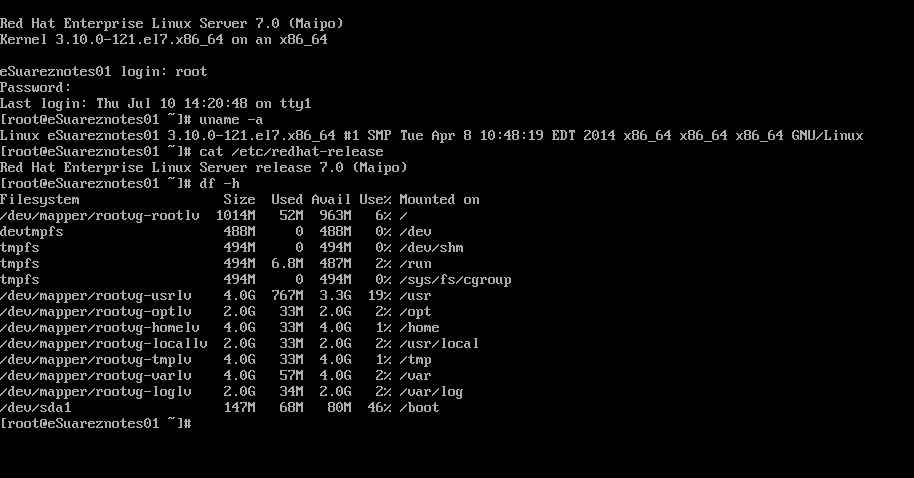
On this notes i have used Red Hat Enterprise 7. This notes should be almost be like same procedure when you use other Red hat version may only differ at some points which i will try to determine.
i have already transferred some iso files on /images/iso directory.
[root@eSuareznotes01 html]# ls -l /images/iso/
total 11694384
-rw-r--r--. 1 root root 4378114048 Jul  4 17:48 rhel-server-5.10-x86_64-dvd.iso
-rw-r--r--. 1 root root 3853516800 May 23 17:22 rhel-server-6.5-x86_64-dvd.iso
-rw-r--r--. 1 root root 3743416320 Jul 13 04:32 rhel-server-7.0-x86_64-dvd.iso
Lets us begin and bear with my silly notes:
[root@eSuareznotes01 ~]# mkdir -p /images/linux_CD/rhel7_u0x64 #Create the directory where you will place the files.
[root@eSuareznotes01 ~]# mount -o loop /images/iso/rhel-server-7.0-x86_64-dvd.iso /mnt #Mount the Red Hat iso file
mount: /dev/loop0 is write-protected, mounting read-only
[root@eSuareznotes01 ~]# cp -arv /mnt/. /images/linux_CD/rhel7_u0x64/ #Copy the mounted file to the local directory
[root@eSuareznotes01 ~]# umount -l /mnt/ #unmount the mounted partition
Now Create the local repo file.
for local server: Note: don’t forget to use three slashes in the baseurl if your repointing it to a file location
[root@eSuareznotes01 ~]# vi /etc/yum.repos.d/rhel7_u0x64.repo #You can choose whatever filename, i named mine as rhel7_u0x64.repo
[rhel7_u0x64]
name=RHEL 7.0 64-bit on localhost
baseurl=file:///images/linux_CD/rhel7_u0x64
gpgcheck=1
gpgkey=file:///images/linux_CD/rhel7_u0x64/RPM-GPG-KEY-redhat-release
enabled=1
[root@eSuareznotes01 ~]# yum repolist #Do yum repo list
Loaded plugins: product-id, subscription-manager
This system is not registered to Red Hat Subscription Management. You can use subscription-manager to register.
rhel7_u0x64 | 4.1 kB 00:00:00
(1/2): rhel7_u0x64/group_gz | 134 kB 00:00:00
(2/2): rhel7_u0x64/primary_db | 3.4 MB 00:00:00
repo id repo name status
rhel7_u0x64 RHEL 7.0 64-bit on localhost 4,305
repolist: 4,305
On the installation guide I have made mentioned there that “the iso I used is based on April 2014 release so likely that is not the latest kernel that was out June 2014 release. Latest kernel should be kernel 3.10.0-123.”
For the purpose of this guide that came in handy since the iso I uploaded to my system is from June 2014 release we then can test if yum would work fine.
i will be doing system update on the system
[root@eSuareznotes01 ~]# yum update
Loaded plugins: product-id, subscription-manager
This system is not registered to Red Hat Subscription Management. You can use subscription-manager to register.
rhel7_u0x64                                                                         | 4.1 kB  00:00:00
(1/2): rhel7_u0x64/group_gz                                                         | 134 kB  00:00:00
(2/2): rhel7_u0x64/primary_db                                                       | 3.4 MB  00:00:00
Resolving Dependencies
--> Running transaction check
---> Package NetworkManager.x86_64 1:0.9.9.1-12.git20140326.4dba720.el7 will be updated
---> Package NetworkManager.x86_64 1:0.9.9.1-13.git20140326.4dba720.el7 will be an update
---> Package NetworkManager-config-server.x86_64 1:0.9.9.1-12.git20140326.4dba720.el7 will be updated
---> Package NetworkManager-config-server.x86_64 1:0.9.9.1-13.git20140326.4dba720.el7 will be an update
---> Package NetworkManager-glib.x86_64 1:0.9.9.1-12.git20140326.4dba720.el7 will be updated
---> Package NetworkManager-glib.x86_64 1:0.9.9.1-13.git20140326.4dba720.el7 will be an update
---> Package NetworkManager-tui.x86_64 1:0.9.9.1-12.git20140326.4dba720.el7 will be updated
---> Package NetworkManager-tui.x86_64 1:0.9.9.1-13.git20140326.4dba720.el7 will be an update
---> Package dracut.x86_64 0:033-160.el7 will be updated
---> Package dracut.x86_64 0:033-161.el7 will be an update
---> Package dracut-config-rescue.x86_64 0:033-160.el7 will be updated
---> Package dracut-config-rescue.x86_64 0:033-161.el7 will be an update
---> Package dracut-network.x86_64 0:033-160.el7 will be updated
---> Package dracut-network.x86_64 0:033-161.el7 will be an update
---> Package kernel.x86_64 0:3.10.0-123.el7 will be installed
---> Package kernel-tools.x86_64 0:3.10.0-121.el7 will be updated
---> Package kernel-tools.x86_64 0:3.10.0-123.el7 will be an update
---> Package kernel-tools-libs.x86_64 0:3.10.0-121.el7 will be updated
---> Package kernel-tools-libs.x86_64 0:3.10.0-123.el7 will be an update
---> Package kexec-tools.x86_64 0:2.0.4-30.el7 will be updated
---> Package kexec-tools.x86_64 0:2.0.4-32.el7 will be an update
---> Package yum.noarch 0:3.4.3-117.el7 will be updated
---> Package yum.noarch 0:3.4.3-118.el7 will be an update
--> Finished Dependency Resolution

Dependencies Resolved

===========================================================================================================
 Package                         Arch      Version                                    Repository      Size
===========================================================================================================
Installing:
 kernel                          x86_64    3.10.0-123.el7                             rhel7_u0x64     29 M
Updating:
 NetworkManager                  x86_64    1:0.9.9.1-13.git20140326.4dba720.el7       rhel7_u0x64    1.4 M
 NetworkManager-config-server    x86_64    1:0.9.9.1-13.git20140326.4dba720.el7       rhel7_u0x64    101 k
 NetworkManager-glib             x86_64    1:0.9.9.1-13.git20140326.4dba720.el7       rhel7_u0x64    368 k
 NetworkManager-tui              x86_64    1:0.9.9.1-13.git20140326.4dba720.el7       rhel7_u0x64    189 k
 dracut                          x86_64    033-161.el7                                rhel7_u0x64    296 k
 dracut-config-rescue            x86_64    033-161.el7                                rhel7_u0x64     42 k
 dracut-network                  x86_64    033-161.el7                                rhel7_u0x64     78 k
 kernel-tools                    x86_64    3.10.0-123.el7                             rhel7_u0x64    663 k
 kernel-tools-libs               x86_64    3.10.0-123.el7                             rhel7_u0x64    603 k
 kexec-tools                     x86_64    2.0.4-32.el7                               rhel7_u0x64    320 k
 yum                             noarch    3.4.3-118.el7                              rhel7_u0x64    1.2 M

Transaction Summary
===========================================================================================================
Install   1 Package
Upgrade  11 Packages

Total download size: 34 M
Is this ok [y/d/N]: y
Downloading packages:
warning: /images/linux_CD/rhel7_u0x64/Packages/NetworkManager-0.9.9.1-13.git20140326.4dba720.el7.x86_64.rpm: Header V3 RSA/SHA256 Signature, key ID fd431d51: NOKEY
Public key for NetworkManager-0.9.9.1-13.git20140326.4dba720.el7.x86_64.rpm is not installed
-----------------------------------------------------------------------------------------------------------
Total                                                                       69 MB/s |  34 MB  00:00:00
Retrieving key from file:///images/linux_CD/rhel7_u0x64/RPM-GPG-KEY-redhat-release
Importing GPG key 0xFD431D51:
 Userid     : "Red Hat, Inc. (release key 2) "
 Fingerprint: 567e 347a d004 4ade 55ba 8a5f 199e 2f91 fd43 1d51
 From       : /images/linux_CD/rhel7_u0x64/RPM-GPG-KEY-redhat-release
Is this ok [y/N]: y
Importing GPG key 0x2FA658E0:
 Userid     : "Red Hat, Inc. (auxiliary key) "
 Fingerprint: 43a6 e49c 4a38 f4be 9abf 2a53 4568 9c88 2fa6 58e0
 From       : /images/linux_CD/rhel7_u0x64/RPM-GPG-KEY-redhat-release
Is this ok [y/N]: y
Running transaction check
Running transaction test
Transaction test succeeded
Running transaction
  Updating   : dracut-033-161.el7.x86_64                                                              1/23
  Updating   : 1:NetworkManager-glib-0.9.9.1-13.git20140326.4dba720.el7.x86_64                        2/23
  Updating   : 1:NetworkManager-0.9.9.1-13.git20140326.4dba720.el7.x86_64                             3/23
  Updating   : dracut-network-033-161.el7.x86_64                                                      4/23
  Updating   : kernel-tools-libs-3.10.0-123.el7.x86_64                                                5/23
  Updating   : kernel-tools-3.10.0-123.el7.x86_64                                                     6/23
  Updating   : kexec-tools-2.0.4-32.el7.x86_64                                                        7/23
  Updating   : 1:NetworkManager-tui-0.9.9.1-13.git20140326.4dba720.el7.x86_64                         8/23
  Installing : kernel-3.10.0-123.el7.x86_64                                                           9/23
  Updating   : dracut-config-rescue-033-161.el7.x86_64                                               10/23
  Updating   : 1:NetworkManager-config-server-0.9.9.1-13.git20140326.4dba720.el7.x86_64              11/23
  Updating   : yum-3.4.3-118.el7.noarch                                                              12/23
  Cleanup    : 1:NetworkManager-tui-0.9.9.1-12.git20140326.4dba720.el7.x86_64                        13/23
  Cleanup    : kexec-tools-2.0.4-30.el7.x86_64                                                       14/23
  Cleanup    : dracut-network-033-160.el7.x86_64                                                     15/23
  Cleanup    : dracut-config-rescue-033-160.el7.x86_64                                               16/23
  Cleanup    : 1:NetworkManager-config-server-0.9.9.1-12.git20140326.4dba720.el7.x86_64              17/23
  Cleanup    : yum-3.4.3-117.el7.noarch                                                              18/23
  Cleanup    : 1:NetworkManager-0.9.9.1-12.git20140326.4dba720.el7.x86_64                            19/23
  Cleanup    : kernel-tools-3.10.0-121.el7.x86_64                                                    20/23
  Cleanup    : kernel-tools-libs-3.10.0-121.el7.x86_64                                               21/23
  Cleanup    : 1:NetworkManager-glib-0.9.9.1-12.git20140326.4dba720.el7.x86_64                       22/23
  Cleanup    : dracut-033-160.el7.x86_64                                                             23/23
rhel7_u0x64/productid                                                               | 1.6 kB  00:00:00
  Verifying  : 1:NetworkManager-glib-0.9.9.1-13.git20140326.4dba720.el7.x86_64                        1/23
  Verifying  : kexec-tools-2.0.4-32.el7.x86_64                                                        2/23
  Verifying  : kernel-3.10.0-123.el7.x86_64                                                           3/23
  Verifying  : dracut-config-rescue-033-161.el7.x86_64                                                4/23
  Verifying  : yum-3.4.3-118.el7.noarch                                                               5/23
  Verifying  : 1:NetworkManager-config-server-0.9.9.1-13.git20140326.4dba720.el7.x86_64               6/23
  Verifying  : kernel-tools-3.10.0-123.el7.x86_64                                                     7/23
  Verifying  : dracut-network-033-161.el7.x86_64                                                      8/23
  Verifying  : dracut-033-161.el7.x86_64                                                              9/23
  Verifying  : 1:NetworkManager-0.9.9.1-13.git20140326.4dba720.el7.x86_64                            10/23
  Verifying  : 1:NetworkManager-tui-0.9.9.1-13.git20140326.4dba720.el7.x86_64                        11/23
  Verifying  : kernel-tools-libs-3.10.0-123.el7.x86_64                                               12/23
  Verifying  : 1:NetworkManager-0.9.9.1-12.git20140326.4dba720.el7.x86_64                            13/23
  Verifying  : 1:NetworkManager-tui-0.9.9.1-12.git20140326.4dba720.el7.x86_64                        14/23
  Verifying  : kexec-tools-2.0.4-30.el7.x86_64                                                       15/23
  Verifying  : 1:NetworkManager-glib-0.9.9.1-12.git20140326.4dba720.el7.x86_64                       16/23
  Verifying  : dracut-033-160.el7.x86_64                                                             17/23
  Verifying  : kernel-tools-3.10.0-121.el7.x86_64                                                    18/23
  Verifying  : dracut-network-033-160.el7.x86_64                                                     19/23
  Verifying  : 1:NetworkManager-config-server-0.9.9.1-12.git20140326.4dba720.el7.x86_64              20/23
  Verifying  : dracut-config-rescue-033-160.el7.x86_64                                               21/23
  Verifying  : kernel-tools-libs-3.10.0-121.el7.x86_64                                               22/23
  Verifying  : yum-3.4.3-117.el7.noarch                                                              23/23

Installed:
  kernel.x86_64 0:3.10.0-123.el7

Updated:
  NetworkManager.x86_64 1:0.9.9.1-13.git20140326.4dba720.el7
  NetworkManager-config-server.x86_64 1:0.9.9.1-13.git20140326.4dba720.el7
  NetworkManager-glib.x86_64 1:0.9.9.1-13.git20140326.4dba720.el7
  NetworkManager-tui.x86_64 1:0.9.9.1-13.git20140326.4dba720.el7
  dracut.x86_64 0:033-161.el7
  dracut-config-rescue.x86_64 0:033-161.el7
  dracut-network.x86_64 0:033-161.el7
  kernel-tools.x86_64 0:3.10.0-123.el7
  kernel-tools-libs.x86_64 0:3.10.0-123.el7
  kexec-tools.x86_64 0:2.0.4-32.el7
  yum.noarch 0:3.4.3-118.el7
Check new kernel version after update:
[root@eSuareznotes01 ~]# uname -a
Linux eSuareznotes01 3.10.0-123.el7.x86_64 #1 SMP Mon May 5 11:16:57 EDT 2014 x86_64 x86_64 x86_64 GNU/Linux
Now i will be using http as protocol for my local repo so it can push files to the network.
[root@eSuareznotes01 ~]# yum -y install httpd perl perl-CGI php php-pear #perl perl-CGI php php-pear is not necessary I installed it for future use
For Red Hat Enteprise 7 only
[root@eSuareznotes01 ~]# systemctl start httpd.service #Start httpd service process
[root@eSuareznotes01 ~]# systemctl enable httpd.service #Enable system service to start every boot time
ln -s ‘/usr/lib/systemd/system/httpd.service’ ‘/etc/systemd/system/multi-user.target.wants/httpd.service’
For other Red Hat version
[root@rhel6~]# /etc/rc.d/init.d/httpd start #Start httpd service
Starting httpd: [ OK ]
[root@rhel6 ~]# chkconfig httpd on #Enable service to start at reboot
Since i am using the file hosted on other partition i have repoint it to show contents on the httpd directory which is located at /var/www/html
[root@eSuareznotes01 ~]# ln -s /images/iso/ /var/www/html/iso
[root@eSuareznotes01 ~]# ln -s /images/linux_CD/ /var/www/html/linux_CD
Configuring firewalld to allow http connection #For Red Hat Enteprise 7.0 only as other version uses iptables instead
This should serve as sample on how to configure firewalld and some sets of commands:
Check which zone are you running:
[root@eSuareznotes01 zones]# firewall-cmd –get-active-zone
public
interfaces: eth0
[root@eSuareznotes01 zones]# firewall-cmd –zone=external –change-interface=eth0
success
[root@eSuareznotes01 zones]# firewall-cmd –get-active-zone
external
interfaces: eth0
[root@eSuareznotes01 zones]# firewall-cmd –zone=external –list-services
ssh
[root@eSuareznotes01 system]# firewall-cmd –zone=external –add-service=http
success
[root@eSuareznotes01 system]# firewall-cmd –zone=external –list-all
external (active)
interfaces: eth0
sources:
services: ssh
ports: 300/tcp
masquerade: yes
forward-ports:
icmp-blocks:
rich rules:
Configure Iptables to allow http connection #For other Red hat version that uses iptable by default
vi /etc/sysconfig/iptables
Add this lines under INPUT sections
-A INPUT -p tcp -m tcp –dport 80 -j ACCEPT
Save the file and restart iptables.
/etc/init.d/iptables restart
Selinux
[root@eSuareznotes01 /]# sestatus
SELinux status: enabled
SELinuxfs mount: /sys/fs/selinux
SELinux root directory: /etc/selinux
Loaded policy name: targeted
Current mode: enforcing
Mode from config file: enforcing
Policy MLS status: enabled
Policy deny_unknown status: allowed
Max kernel policy version: 28
Check SELinux security context
[root@eSuareznotes01 /]# ls -Z /var/www/html/
-rw-r–r–. root root unconfined_u:object_r:httpd_sys_content_t:s0 index.html
lrwxrwxrwx. root root unconfined_u:object_r:httpd_sys_content_t:s0 iso -> /images/iso/
lrwxrwxrwx. root root unconfined_u:object_r:httpd_sys_content_t:s0 linux_CD -> /images/linux_CD/
-rw-r–r–. root root unconfined_u:object_r:httpd_sys_content_t:s0 phpinfo.php
[root@eSuareznotes01 /]# chcon -Rv –type=httpd_sys_content_t /images
After allowing on the firewalld and SELinux you should be able to see over the network the contents
You should be able to reach the contents http://xxx.xxx.xxx.xxx/linux_CD/
On remote machine configuration
vi /etc/yum.repos.d/whatevername.repo
[rhel7_u0x64]
name=RHEL 7.0 64-bit on localhost
baseurl=http://xxx.xxx.xxx.xxx/linux_CD/rhel7_u0x64
gpgcheck=1
gpgkey=http://xxx.xxx.xxx.xxx/linux_CD/rhel7_u0x64/RPM-GPG-KEY-redhat-release
enabled=1
Where xxx.xxx.xxx.xxx is the ip of your local repo server
Will Update…









 eSuarez Notes